Document Scanning: Turning Paper Records into Accessible Digital Information
Paper documents remain an important part of many organisations, but storing large quantities of physical paperwork can become increasingly difficult. Filing cabinets, archive boxes and storage rooms occupy valuable space, while finding one particular record can require considerably more time than retrieving information from a well-organised digital archive. For organisations reviewing how they manage historical and current records, converting paper into digital files can provide a practical alternative.
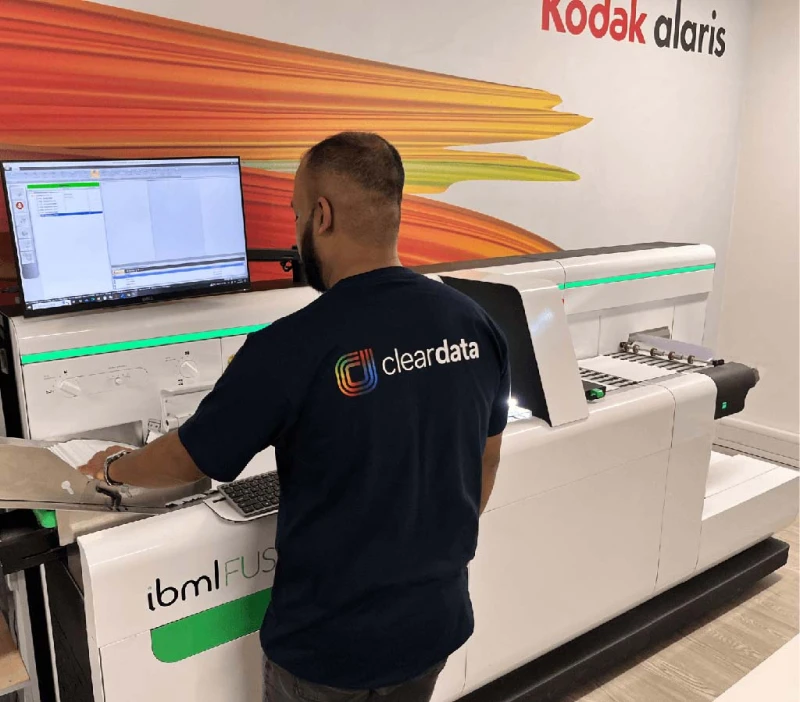
Document scanning is the process of converting physical records into digital files that can be stored, organised, searched and retrieved electronically. It can be used for everything from invoices and contracts to personnel records, technical drawings, customer files and historical archives. The objective is not simply to create pictures of pieces of paper, but to establish a structured digital collection that makes information easier to manage.
Before any large scanning project begins, it is important to understand the documents involved. A few boxes of standard A4 paperwork require a very different approach from an archive containing hundreds of thousands of pages, bound volumes, photographs, oversized plans or fragile historical records.
The condition of the documents matters too. Staples, paperclips, folders and bindings may need to be removed before pages can pass through high-volume scanning equipment. Torn or delicate documents may require manual handling, while unusual sizes can require specialist scanners.
Organisations should also consider why they are digitising the archive. Reducing physical storage may be the main objective, but faster information retrieval, remote access, business continuity and improved records management can be equally important.
Understanding the purpose helps determine how files should be organised. Scanning thousands of pages without a sensible indexing structure can simply replace an inconvenient paper archive with an inconvenient digital one.
From Paper Files to Searchable Digital Records
A typical scanning project begins with document preparation. Records may need to be sorted, unwanted material identified and pages prepared for scanning. Maintaining the correct order can be particularly important where individual documents belong to customer, employee, property or project files.
Once prepared, documents can be scanned at settings appropriate for their intended use. Resolution, colour mode and file format influence both image quality and storage requirements.
Black-and-white text records may not require the same settings as colour photographs or detailed technical documents. Selecting appropriate specifications can therefore avoid unnecessarily large files while maintaining the information required.
Quality control is an essential part of professional document scanning. Pages can occasionally feed together, appear at an angle or contain sections that are difficult to read. Checks should be incorporated into the process to identify missing, incomplete or poor-quality scans before the original paperwork is returned, archived or securely destroyed.
File naming is equally important. A folder containing thousands of files called scan001, scan002 and scan003 provides very limited practical benefit.
Instead, documents can be indexed using meaningful information such as reference numbers, customer names, dates, document categories or other relevant metadata. The appropriate indexing method depends on how users are likely to search for the records later.
Optical character recognition, commonly known as OCR, can provide another useful layer of functionality. OCR software analyses scanned pages and attempts to recognise printed characters, potentially allowing the text within documents to become searchable.
This can significantly improve retrieval within large archives. Instead of knowing exactly which folder contains a document, users may be able to search for names, reference numbers or phrases contained within the scanned material.
OCR accuracy can vary according to the quality and type of the original document. Clear printed text generally provides better results than handwriting, faded copies, unusual fonts or damaged pages. Important information should therefore not automatically be assumed to have been recognised perfectly.
The finished files can be provided in formats appropriate for their intended use. PDF is widely used for general business records, while other formats may be appropriate for images, drawings or specialist archival requirements.
Security, Storage and Long-Term Management
Digitising records does not remove the need for information security. In many cases, scanned archives contain confidential commercial, financial, employee or customer information, making access control an important consideration.
Organisations should establish who needs access and how permissions will be managed. Employees may require access to particular categories of records without needing unrestricted access to the complete archive.
Encryption, secure storage, authentication and appropriate backup arrangements can all form part of a wider information-management strategy.
The location of digital files should also be considered carefully. They may be stored on internal systems, within a document management platform or using suitable cloud infrastructure. The appropriate solution depends on factors including security requirements, accessibility and existing IT systems.
Backup is particularly important. One advantage of digital information is that additional protected copies can be maintained in separate locations. However, simply scanning documents onto one computer or storage device does not create an adequate business continuity solution.
Retention policies should also continue to apply after digitisation. Converting a document into a digital file does not necessarily mean it should be retained indefinitely. Organisations may have legal, regulatory or operational requirements governing how long different categories of information should be kept.
Similarly, organisations need to decide what happens to the original paperwork after scanning. Some documents may need to be retained physically for legal, contractual, historical or operational reasons.
Where originals are no longer required, confidential records should be disposed of appropriately. Secure destruction may form part of a wider digitisation project, but organisations should establish their retention requirements before authorising destruction.
Data protection is another consideration where documents contain personal information. Organisations handling personal data need appropriate processes governing its security, accessibility, retention and disposal.
A well-planned digitisation project can also improve business continuity. Physical archives can be vulnerable to fire, flooding, accidental damage and simple misfiling. Appropriately backed-up digital records can reduce dependence on a single physical location.
Remote and hybrid working provide another reason organisations review paper-based processes. A document stored in a filing cabinet can normally be accessed only by someone physically present at that location. Digital records can potentially be made securely available to authorised employees wherever their role requires access.
Retrieval speed can improve considerably as well. Searching indexed digital records can be substantially faster than manually checking boxes and folders, particularly where organisations maintain many years of documentation.
Digitisation can also free physical space. Archive rooms and filing cabinets may occupy areas that could otherwise be used for operational activities, additional workspaces or other business purposes.
However, successful scanning projects require planning. Simply converting everything without considering indexing, retention or access can create a large collection of files that remains difficult to use.
Before beginning, it can be helpful to establish document categories, estimated volumes, required file formats, indexing fields, security requirements and quality standards. Decisions about original document retention should also be agreed in advance.
Pilot scanning a representative sample can identify potential problems before processing the entire archive. This is particularly useful where records contain mixed paper sizes, handwritten information, photographs or unusual document formats.
For particularly large archives, organisations may choose between scanning records internally and using a specialist service. In-house scanning provides direct control but requires equipment, staff time and appropriate quality processes.
Outsourcing can provide access to higher-capacity equipment and established workflows, although organisations should examine security arrangements, document transportation, confidentiality procedures and quality-control standards when selecting a provider.
The right approach ultimately depends on the volume and sensitivity of the records, the resources available and how quickly the organisation needs the archive converted.
Ultimately, document scanning is most valuable when it forms part of a broader information-management strategy rather than being treated simply as a way to remove paper. Careful preparation, appropriate indexing, quality control, secure storage and sensible retention policies can transform physical records into an organised digital resource that is easier to search, protect, access and manage over the long term.